
JUMP STRAIGHT TO THE SIDE BY SIDE COMPARISONS
Here are screencap vids of the vibecoding from Claude Fable and versus Kimi K3. The results are SO GOOD I have to have a think whether they may have pre-trained on the sample. I got a modest amount of HN traffic though in no way am I at the Pelican Riding A Bicycle level. There’s not time to run a fresh benchmark right now watch for one soon. I also used the freebie tier where Kimi.com was kind enough to give the public free K3 Max results. I ran out of free daily usage, so what you are seeing is unrefined one-shot K3 versus refined multi-shot Claude Fable results. You can see that the one-shot results are still superb.
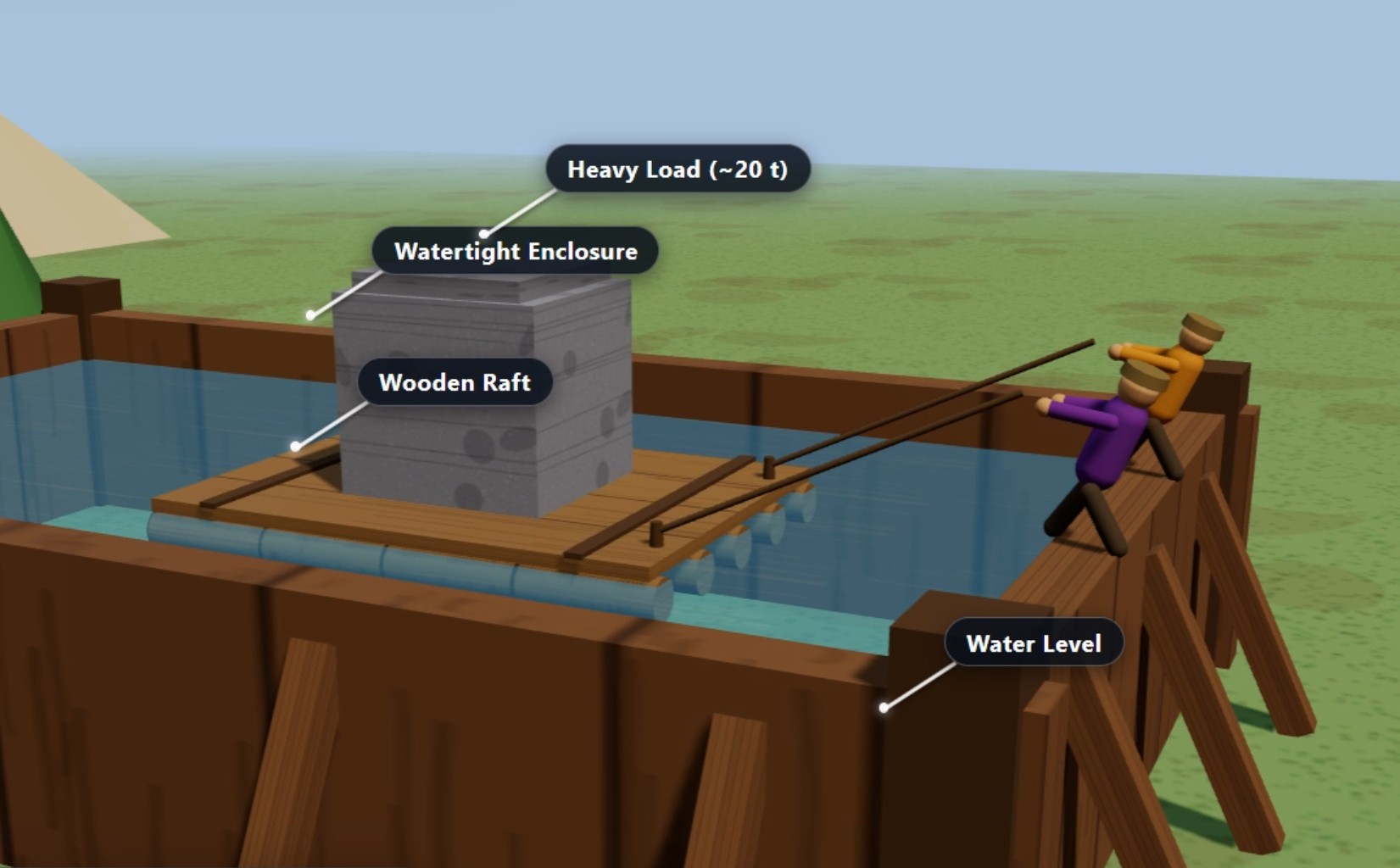
Kimi K3 Max has:
- Amazing graphics
- Textures
- Animations
- The workers wave to you at the end of the final part Stage 6/6. Lovely! To capture this I manually zoom in to capture the waving in the video
- The workers tug the ropes, and stop tugging at the correct point
- Camera Follows
- Really good Rolling Log physics and sensible behaviour. By far the best so far
There were also some problems
- The inference was very slow. 10-15 minutes for each major interaction.
- The heavy load is towed the wrong way
- The existing pyramid is a shambles
- The final towing is into clear air, defying gravity
- The ground plane has unsightly flickering
- See for yourself in your browser at the bottom of the page
About this comparison
These are qualitative comparisons. I did roughly the same journey for each model. I started with the same prompt, then guided each model towards the same destination. The starting prompt was made by Google Gemini. Please see my other articles that go into this more. I can release the full on prompts if you want, I have concentrated on making the articles as compact and focused as possible. What you can see is that different models put in different details. I used kimi.com/chat and also ‘published’ the result via the kimi Publish tool
This post continues on from my recent posts GLM5.2, Claude Fable – Rush Test, Vibe Coding My Way to Egyptology #2 – One Year On 2026-05. Directly below are videos, but I have the actual full 3D full version of the GLM5.2 explainer at the bottom of the page.
Screencap Videos Side-By-Side
Stage 0/6
Fable
Kimi K3
GLM5.2 Stage 0: Rolling the Logs onto the raft
Stage 1/6
Fable
Kimi K3
GLM5.2 Stage 1: Forming the enclosure
Stage 2/6
Fable
Kimi K3
GLM5.2 Stage 2: Filling with water
Stage 3/6
Fable
Kimi K3
GLM5.2 Stage 3: Towing the raft into place. GLM got the towing direction wrong
Stage 4/6
Fable
Kimi K3
GLM5.2 Stage 4: Build scaffold underneath load
Stage 5/6
Fable
Kimi K3
GLM5.2 Stage 5: Drain Water
Stage 6/6
Fable
Kimi K3
GLM5.2 Stage 6: Rolling into elevated final location. Then I manually zoom into the waving workers at the end
The 3D finished product
Kimi K3 3D Explainer Interactive Result
(jump to Claude 5.5, jump to Opus 4.8, jump to Fable, jump to GLM 5.2)
Try it for yourself. Click ‘Next Step’ in the frame below. You can move around the 3D scene with your mouse and mouse wheel (zoom)
Appendix
Starting Prompt
As mentioned in previous articles in the series, I used Google Gemini to come up with a starting prompt for all the models
Create a complete, single-file HTML web application using Three.js (via CDN) that demonstrates a detailed 3D physics/engineering concept animation.

CRITICAL VISUAL & PHYSICS REQUIREMENTS:
1. Dynamic Labels: Use THREE.CSS2DRenderer to create clear, legible HTML text labels that follow their respective 3D objects (e.g., "Heavy Load", "Wooden Raft", "Water Level", "Scaffolding"). Include a thin SVG or CSS line connector linking the label to its subject.
2. Rotational Detail: The rolling logs must have highly visible longitudinal stripes or a "barber pole" multi-material pattern so their rotation is perfectly obvious to the viewer.
3. Physics Alignment: Ensure strict geometric alignment. Rolling logs must be perfectly perpendicular (90 degrees) to the direction of the load's movement.
4. Rotational Accuracy: Logs must rotate in exact synchronization with the linear movement of the load ($rotation = position / radius$) to simulate true rolling without slipping.
5. Scale & Context (Humanoids): Include simple, low-poly humanoid figures (built from spheres, capsules, and cylinders) to represent workers. They should actively pose: pushing the load in Stage 0, pulling/towing lines in Stage 3, and standing on the platform.

Technical Infrastructure:
- Include OrbitControls for camera tracking.
- Implement a clean HTML/CSS overlay UI with a "Next Step" button and a text card describing the current physics phase.
- Use a robust state machine (`currentStage` 0 to 6) in the `requestAnimationFrame` loop to ensure smooth, unglitched transitions.
- Generate all textures procedurally using HTML Canvas (`CanvasTexture`) to avoid external image loading or CORS errors.

Animation Stages to Implement:

Stage 0: Load Rolling
- Setup: An empty wooden raft sits on the ground. A heavy block (the load) sits behind it on 4 striped cylindrical logs. Low-poly workers stand behind it in a pushing pose.
- Animation: The workers push, and the block moves forward onto the center of the raft. The logs roll perfectly beneath it, rotating in the correct direction. Once the load is centered, the logs roll away.

Stage 1: Wall Enclosure
- Animation: Thick wooden walls with external angled buttresses slide up from the ground, creating a tight, parallel, perpendicular, watertight enclosure around the raft.

Stage 2: Water Filling & Floating
- Animation: A semi-transparent blue water mesh slowly rises. As it hits the raft, the raft and load realistically float upward due to buoyancy, maintaining stable alignment. A label tracks the rising "Water Level".

Stage 3: Towing
- Animation: Humanoid figures stand at the edge of the pool holding lines. They pull, and the raft is towed horizontally across the water to the far edge/corner of the pool.

Stage 4: Scaffolding Construction
- Animation: A structured grid of thin beige scaffolding beams rapidly assembles/scales up directly underneath the elevated raft, filling the void between the pool floor and the raft.

Stage 5: Draining the Pool
- Animation: The water level drains back to zero. The raft and load remain perfectly stationary, their weight visibly transferring onto the newly built scaffolding platform.

Stage 6: Roll Off
- Animation: Striped logs appear on top of the scaffolding platform beneath the raft. The workers push the raft/load combination smoothly off the scaffolding structure and out of frame.

Provide the complete, self-contained `index.html` file with all CSS, JS, and Three.js logic included. Ensure shadows are enabled on all lights and meshes for depth and grounding.
Journey
This Kimi K3 had only one prompt, because I was using the free tier and it ran out of free credits. So I was not able to go on a Journey with Kimi K3. I did with Fable, which is why some elements on Fable look good… for instance there is a partially complete pyramid in Fable that I added with additional prompting. Kimi has no existing structure to roll the block onto and I would have asked for it if I had extra credits
After the Fable starting prompt, I checked for obvious errors. Most make the same errors.
- The walls are initially opaque and I have to ask for translucent walls
- The buttresses can sometimes be the wrong direction, I ask to correct the direction
- Various aesthetic improvements for the works and the worker animations