
Table of Contents
- Overview
- “A person calms a rearing horse”
- “A fruit cart tumbles down some stairs. The fruit cart sign reads ‘Apple-a-day'”
- Quality Settings Impact Results
- Practical Implications
- What’s Next?
Comparing OpenAI Image Generation Models November 2025: A Comprehensive Quality Analysis between gpt-image-1-mini (new) vs gpt-image-1 (existing)
After my detailed look at gpt-image-1 quality comparison I was keen to do the same analysis of OpenAI’s lates model gpt-image-1-mini.
The Testing Approach
For this expanded analysis, I selected two prompts specifically designed to test different aspects of image generation capabilities:
"A person calms a rearing horse"– This tests the model’s ability to handle human figures, dynamic action, and anatomical accuracy of both humans and animals in interaction."A fruit cart tumbles down some stairs. The fruit cart sign reads 'Apple-a-day'"– This challenges the model with complex physics (tumbling objects), multiple elements (fruit, cart, stairs), and text rendering.
Following Edward Tufte’s visualization principles, I’ve arranged the outputs in small multiples to facilitate direct visual comparison. For each prompt, I generated multiple images across different quality settings to evaluate consistency, feature accuracy, and stability.
For previous legacy models dall-e-3 and dall-e-2 see the previous article
Findings: gpt-image-1-mini “A person calms a rearing horse”
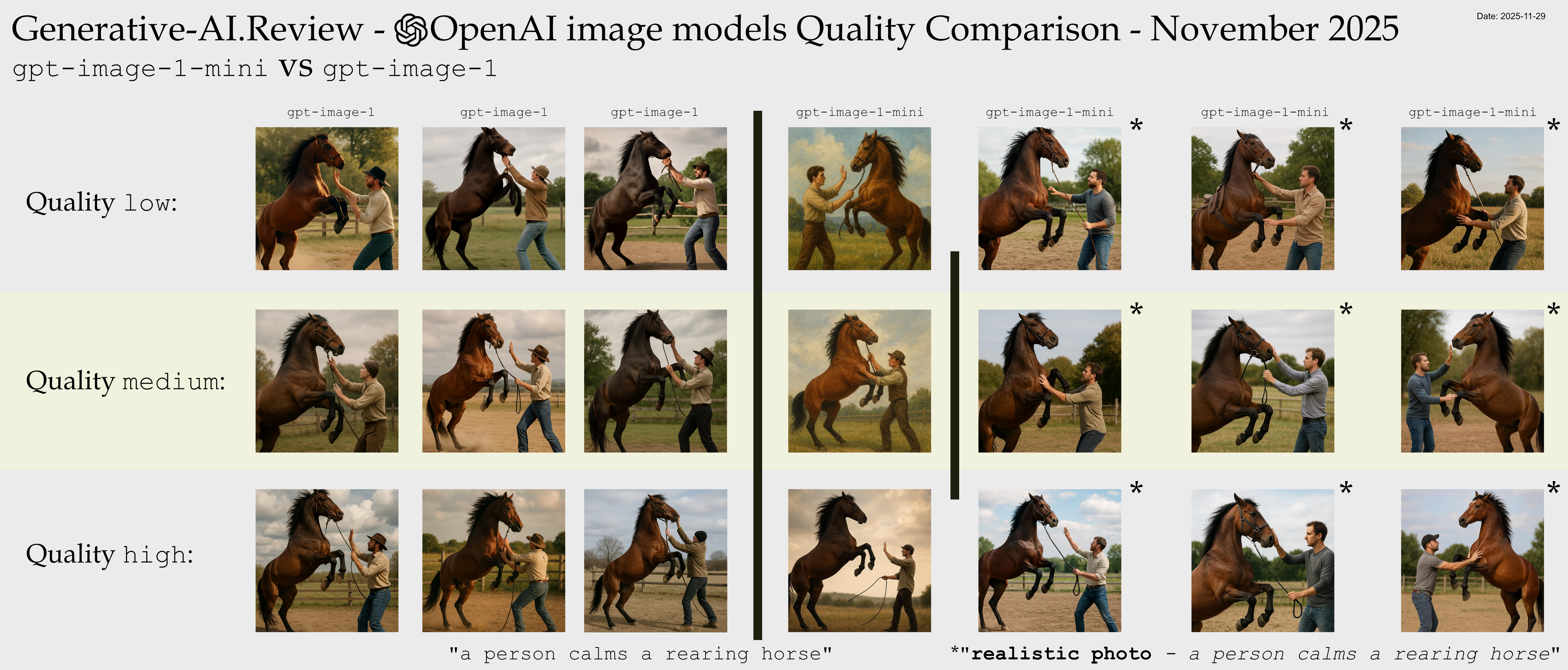
Click for an enormous zoomable version: large 6323x2700px raw link
Technical Note
The middle column was made by gpt-image-1-mini with exactly the same prompt as last time "A person calms a rearing horse". Something has changed in the default style of the mini model such that the output was a drawing. Previous the gpt-image-1 default output style had been photographic realism. So to aid the task of comparison, I also generated the rest with a slightly modified prompt "realistic photo - a person calms a rearing horse". This is a mild change which should preserve most of the original characteristics for side-by-side comparison between models. The generations with the modified prompt are marked with an asterisk (*)
gpt-image-1-mini Low Glitches
Compared to the other model there are not very many glitches at this level.
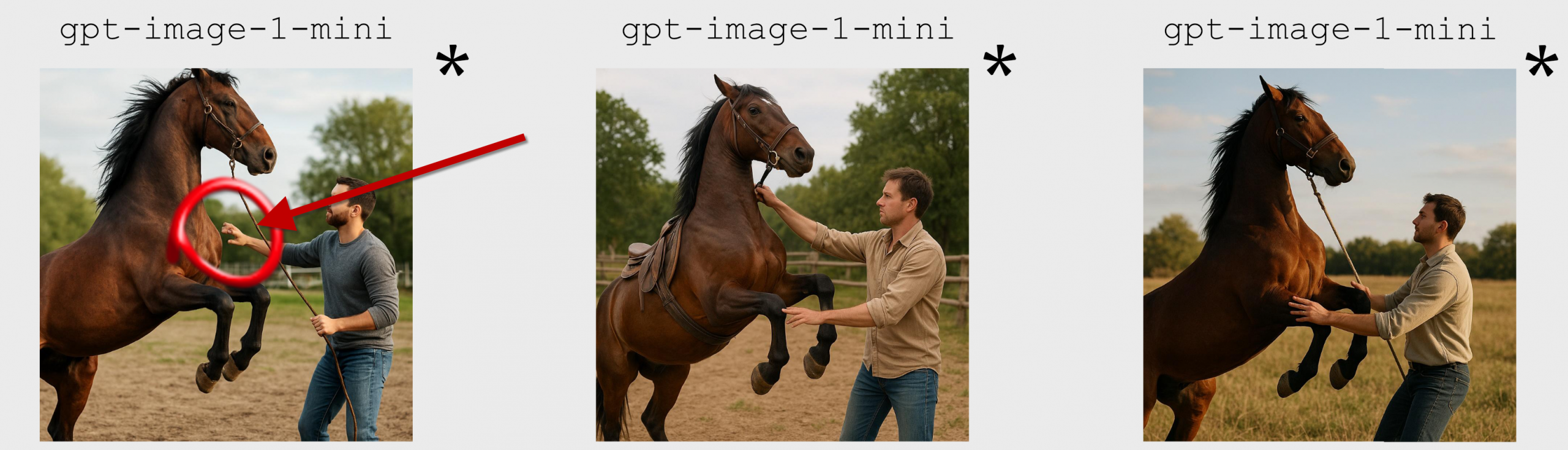
- Left Hand Side
- The person’s outstretched hand has mangled fingers
gpt-image-1-mini Medium Glitches
There were no major glitches that I spotted in Medium.
gpt-image-1-mini High Glitches
Looking at the High Glitches there are still some glitches but more subtle
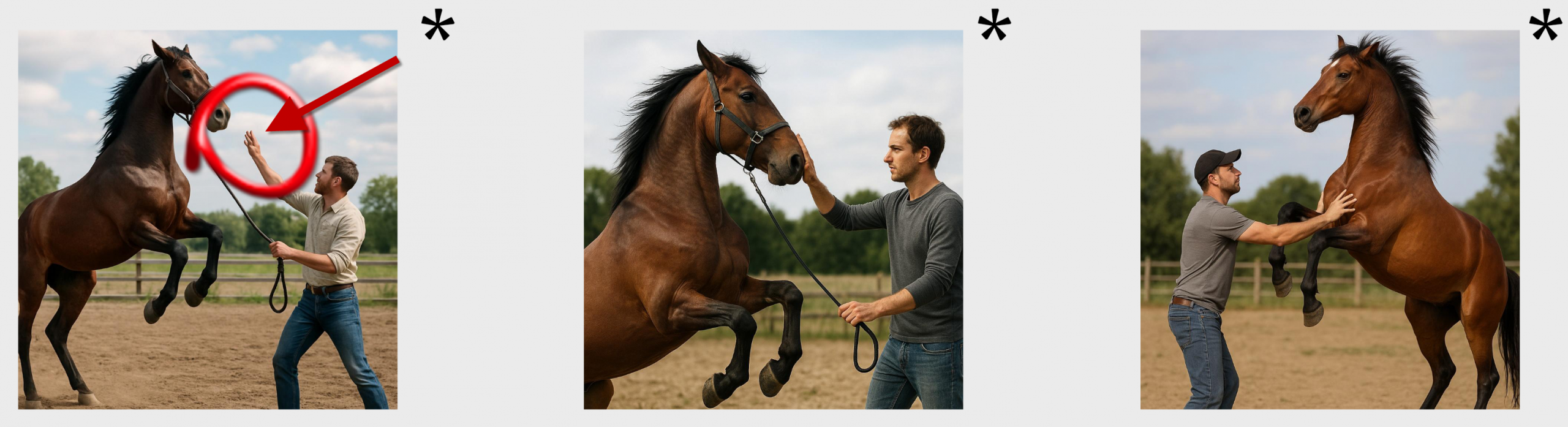
- Left Hand Side
- The person’s fingers are slightly mangled
Comparison with gpt-image-1 model
The ‘person’ is plainer. The person tends not to have a hat. There are fewer glitches detected.
Findings: gpt-image-1-mini “A fruit cart tumbles down some stairs. The fruit cart sign reads ‘Apple-a-day'”
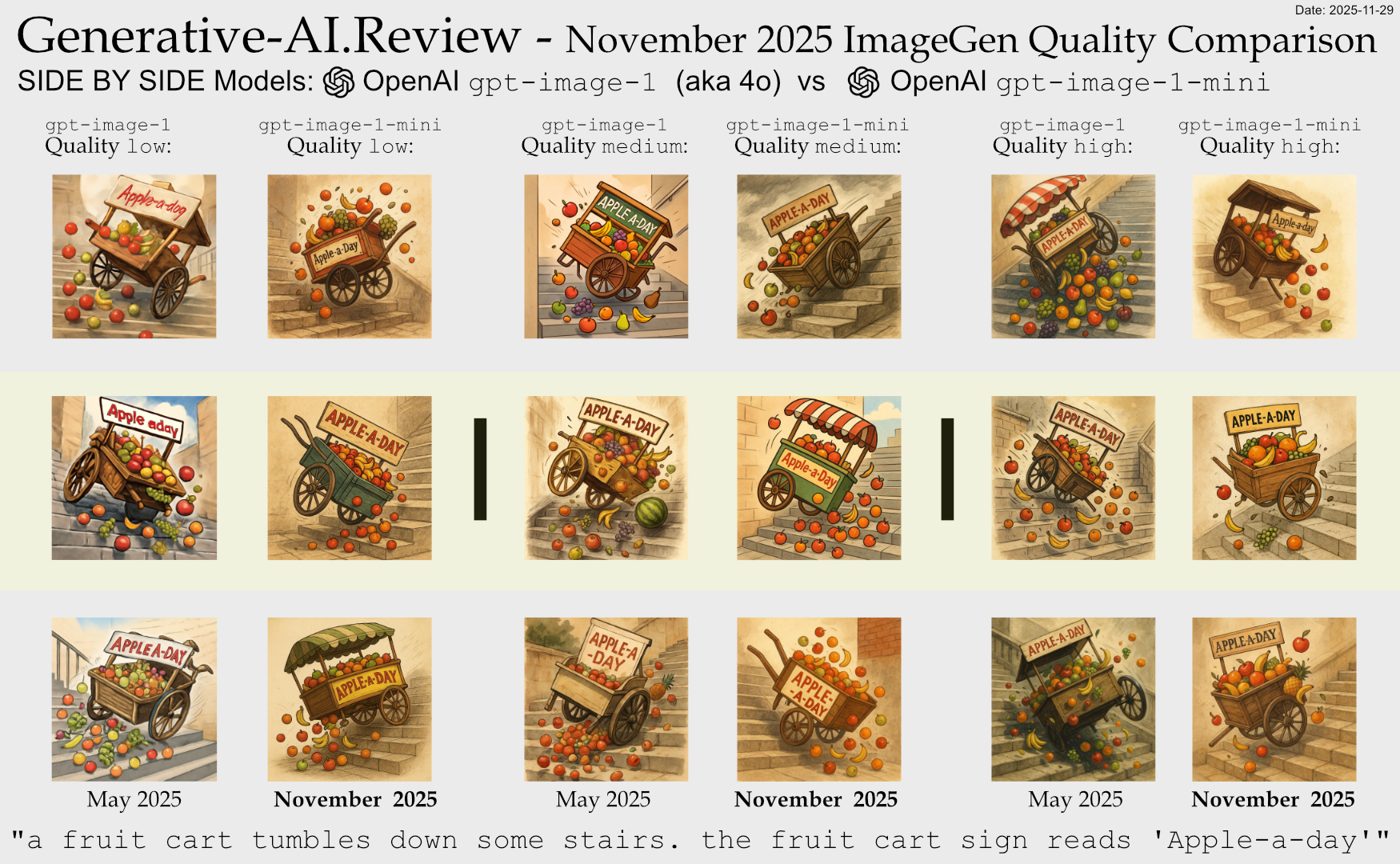
Click for an enormous zoomable version: large 4375x2700px raw link
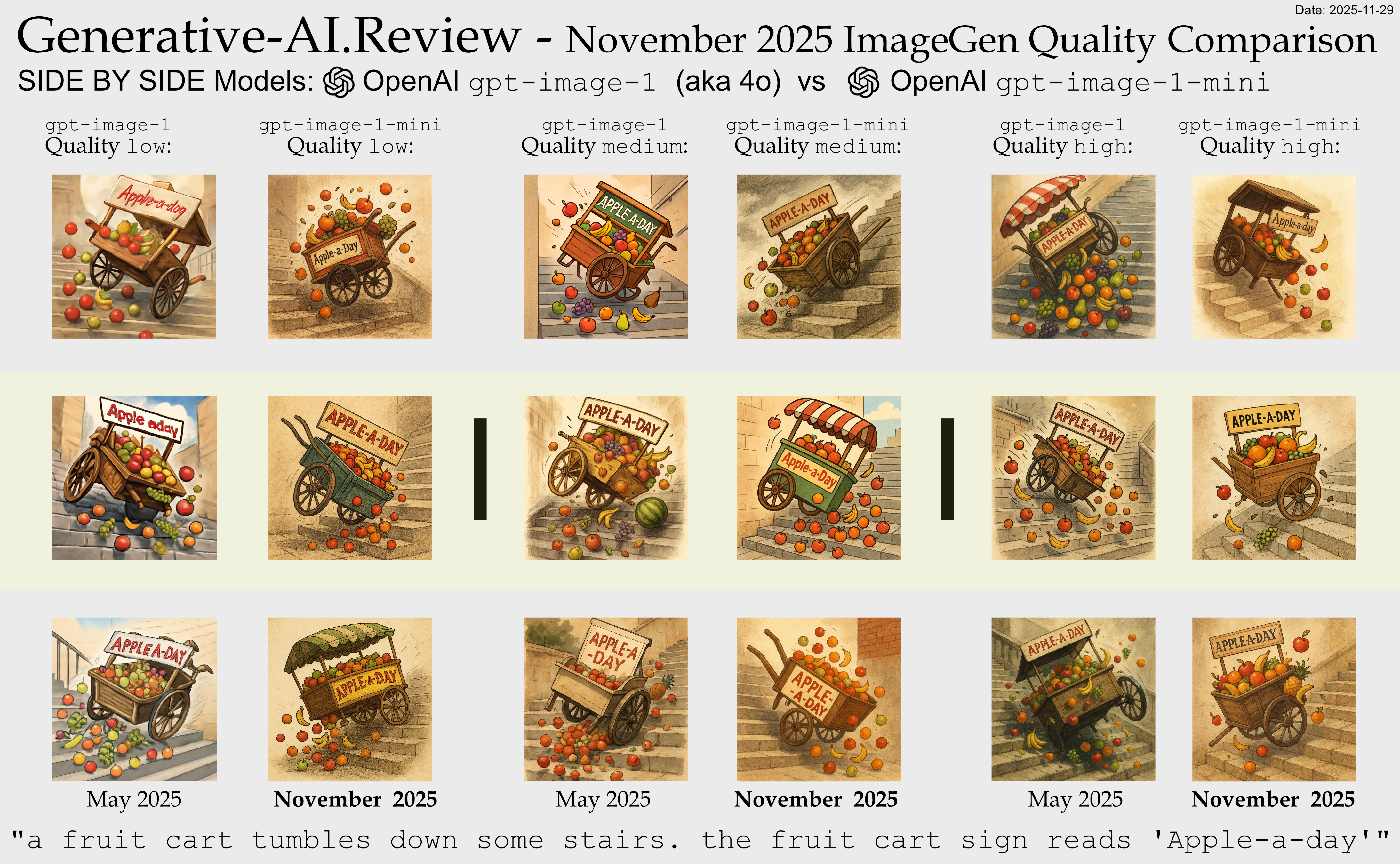
This more complex prompt highlighted several capability edges:
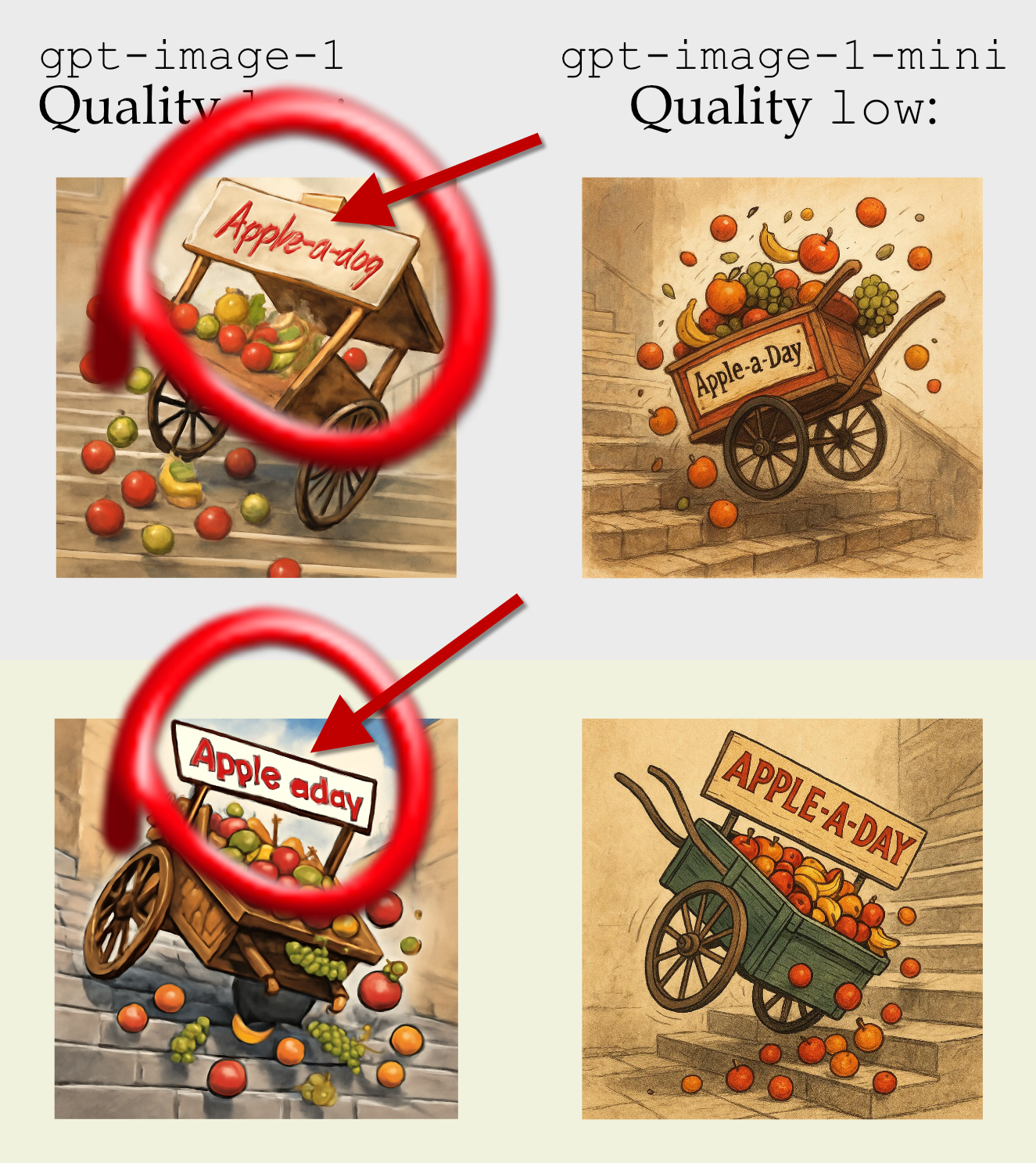
- Text rendering: The “Apple-a-day” text was correctly rendered properly in all gpt-image-1-mini outputs 🙂
- Fruit fidelity:
- High: Good, variety
- Medium: Okay, one had less variety of fruit
- Low: Draft quality
Comparison with previous gpt-image-1 model
Text rendering: The “Apple-a-day” text was correctly rendered properly in all gpt-image-1-mini outputs 🙂 . Previously gpt-image-1 low output Apple-a-dog and Apple e day
Quality Settings Impact Results
The API’s quality settings have less differentiation now. Low quality is a much better baseline, especially with the improved text adherence.
Higher quality settings still produced better results. Check on the very detailed raw images to make your own mind up.
Practical Implications
For practical applications, these findings suggest:
- The baseline is improved. Low is no longer ‘draft’, and may be good enough to use.
- Choose quality settings to taste: Becase “low” may be good-enough, carefully evaluate if your use case requires more.
What’s Next?
Would you be interested in seeing a regular sample of image generations using precisely the same prompts to monitor generation stability over time? This could provide valuable insights into how the model evolves with updates and fine-tuning.
I’m also considering expanding this analysis to include more specialized prompts targeting specific capabilities like architectural rendering, facial expressions, or complex lighting scenarios.